Posts by Folmer (5)

2026-11-02 New map > See all subregions or cities directly

I've changed the mapping feature from using plotly to dash-leaflet. Because dash-leaflet better support viewing many large geojson files (many regions) at the same time, it is now possible to view all the sub-regions (provinces / states) or cities at once. This also makes it possible to view states / provinces and cities for different countries at the same time. 

2026-10-02 Update - Full climate attribution possible - New homepage - Improved Mobile UI

With the latest update the tool is finally starting to look as what I envisioned from the start. In a few easy clicks select your location, a recent extreme event, and do a full scale climate attribution analysis using CMIP6 climate model data. With this tool you can answer a lot of questions regarding our weather, but the trick is to still make it easy and understandable for the non-scientific community. I think with the recent upgrades I'm slowly getting there. Here a list of all the updates:

  • New variable Standardized Precipitation and Evaporation Index (SPEI) > Ideal variable for drought analysis
  • New variable: Fire Weather Index. This index is based on temperature, humidity, wind speed and rainfall, and is one of best (if not the best..) variable to to analyse the risk of forest fires from a weather / climate perspective.
  • Shortcut buttons to very quickly do a often used analysis, e.g. analyse extremes or add future data.
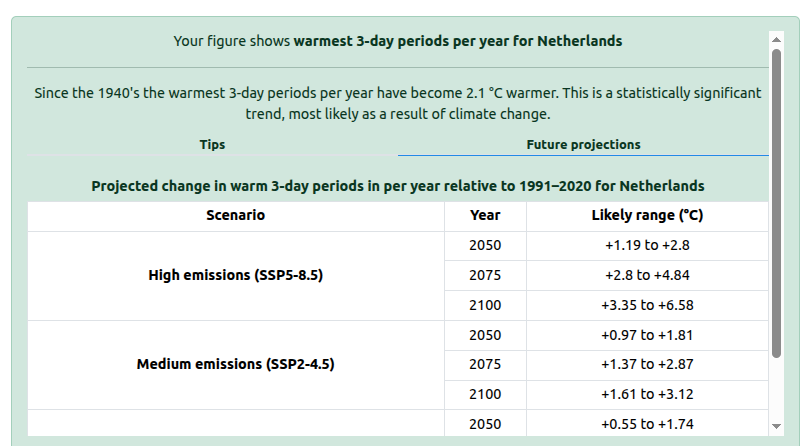
  • Improved future data tables, to clearly see how the selected weather will change towards the future
  • Improved AI integration for impact analysis and figure explanations
  • Reducing loading times for data due to different data structures on the disk
  • Separate app where translations can be modified if the automatic translations are not that good
    If you want to help improve the translations, just contact me!
  • Improved mobile UI > All analysis also possible via mobile.
  • Many other small UI / data improvements...

As always, if you have any feedback please let me know!


2026-06-16 Update - Walkthroughs / Tips / Improved speed

Some new updates for this week are:

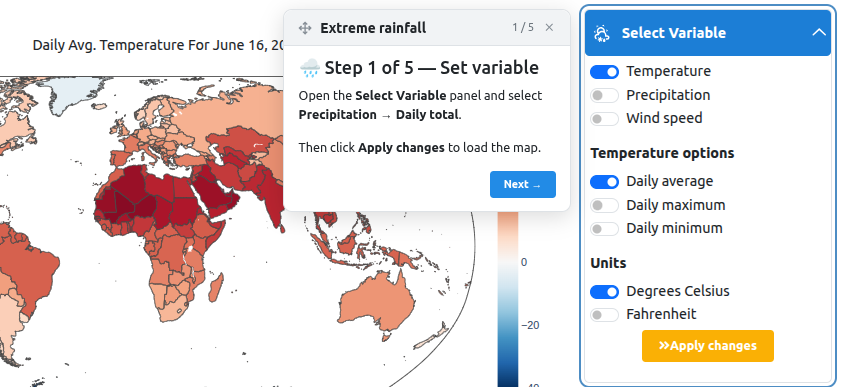
  • Improved walkthroughs. In stead of the static text on top of the app there is a more dynamic box near the input field with direct instructions. This makes the walkthroughs much more easy to follow.
  • The text below the map / graph is now much more elaborate, which clear tips for each figure in order to make it easier what potential next steps are. There is also a tabular summary of the future trends if the future data is added.
  • Climate model data loads are now much faster due to switch from netcdf to zarr datafiles. Read times have decreased ~10 times. This make that even the heavier figures with CMIP6 data have a load time of <2s

All in all, these update should improve the user experience and make it easier to do certain analysis.


2026-06-10 Update - (Re)launch of ClimateRadar

After finally finding the time to work on my own climate analysis platform again, I would like to release a new version of www.climateradar.com. I received great feedback and suggestions from my initial launch, so a lot of those requests are included in this upgrade.

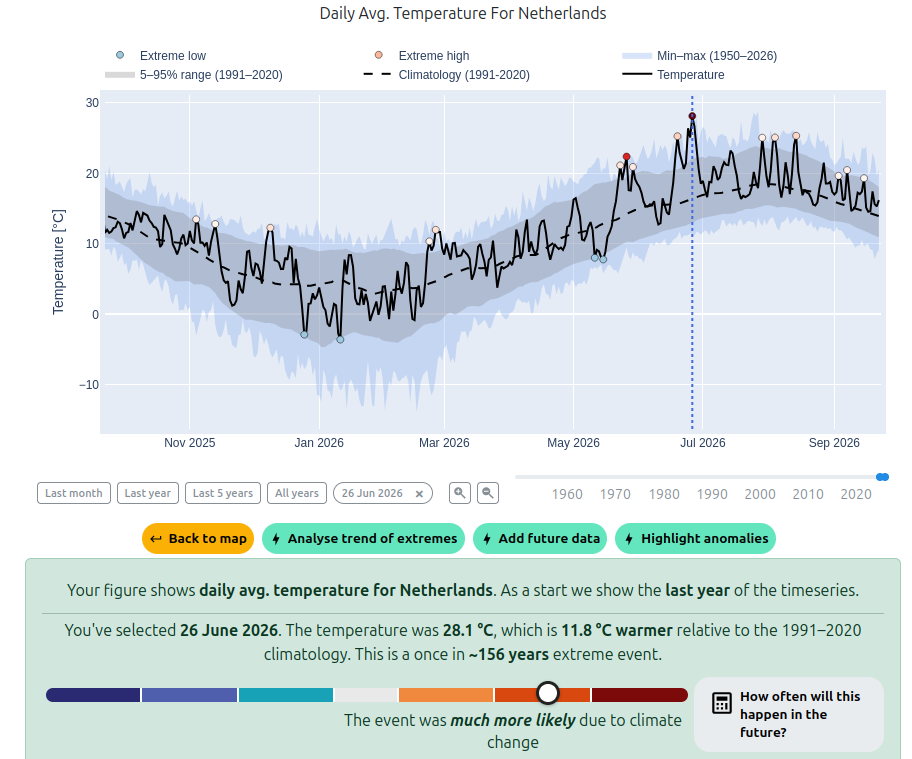
For those who don't know ClimateRadar.com yet: it's a publicly available climate analysis platform that makes it easy for anyone to analyse historical and future weather events and trends. It is based on state-of-the-art reanalysis and bias-correct and downscaled climate model data. The focus is DIY – the tool allows you to do full scale climate analysis all by yourself. No technical background needed! See the figures below for some example analysis.

The main updates are:
• Besides country and regional data, it now also covers the major cities (~7300) around the world.
• Support for multiple languages [EN, NL, DE, ES, FR, IT, ..]. If you want your language added just let me know and I’ll make sure it is added. Please try out one of the languages and let me know how good the translations are.
• More fancy figure types supported. You can’t call yourself a climate analysis platform if you can’t make a ‘Warming Stripes’ plot so that had to be added (and many others).
• Observed weather in the future. You can now translate the actual weather you just experienced to what it will look like in 2035, 2050 or 2085. This is the so called ‘transformed timeseries’, where the delta between historical and future climate model data is applied to historically observed data.
• The reanalysis is available with a 5-day delay. This is very up to date already for all the processing involved, but still a bit ‘yesterday’s news’. In order to also be able analyse today’s weather the last 5 days are extended with GFS +24h forecasts.
• AI assistent that can analyse the impact and meteorological drivers of extreme events.
• and many more updates under the hood..

And with everything that has been happening weather-wise lately, there's plenty to analyse. As always there are some walkthroughs available for specific cases, but feel free to DIY ;-)

I'd love to hear what you think of the new version! What did you like? Where did you get stuck? Any bugs or missing features? Your feedback means a lot and directly shapes the next update.
If you have any ideas how this tool could be used for climate communication and climate education feel free to contact me. I’m actively looking for places where this tool can provide valuable insights. I'm also keen on funding opportunites, as this is fully self-funded (i.e. a fully out of control pet project..).

First launch!

After quite a while of data processing and building an advanced analysis tool I am finally ready to launch this website an get user input on both the website as the analysis tools.